Appearance
Networking Setup
Getting all the previous components running is a common task for system administrators who are accustomed to configuration management. But, to get a fully functional Kubernetes cluster, the network will need to be set up properly, as well.
If you have experience deploying virtual machines (VMs) based on IaaS solutions, this will sound familiar. The only caveat is that, in Kubernetes, the lowest compute unit is not a container, but what we call a Pod.
A Pod is a group of co-located containers that share the same IP address. From a networking perspective, a Pod can be seen as a virtual machine of physical hosts. The network needs to assign IP addresses to Pods, and needs to provide traffic routes between all Pods on any nodes.
The three main networking challenges to solve in a container orchestration system are:
- Coupled container-to-container communications (solved by the Pod concept)
- Pod-to-Pod communications
- External-to-Pod communications.
Kubernetes expects the network configuration to enable Pod-to-Pod communications to be available; it will not do it for you.
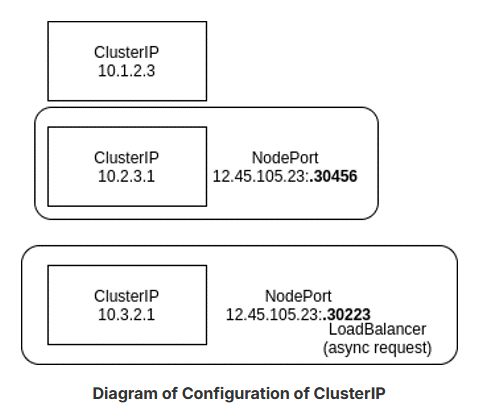
Pods are assigned an IP address prior to application containers being started. The service object is used to connect Pods within the network using ClusterIP addresses, from outside of the cluster using NodePort addresses, and using a load balancer if configured with a LoadBalancer service.
NOTE
A detailed explanation about the Kubernetes networking model can be found in the “Cluster Networking” section of Kubernetes Documentation.
ClusterIP
A ClusterIP is used for traffic within the cluster. A NodePort first creates a ClusterIP, then associates a port of the node to that new ClusterIP. If you create a LoadBalancer service, it will first create a ClusterIP, then a NodePort, and then make an asynchronous request for an external load balancer. If one is not configured to respond, the EXTERNAL-IP will remain in a pending state for the life of the service.
Ingress Controller or Service Mesh
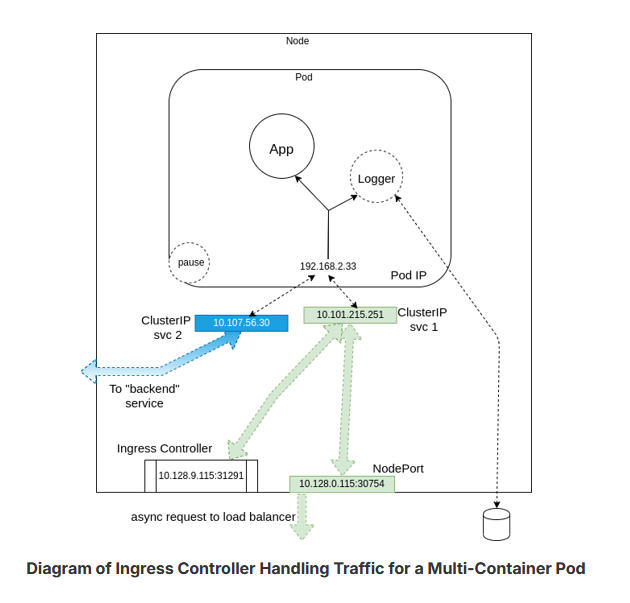
An Ingress Controller or a service mesh like Istio can also be used to connect traffic to a Pod.
The diagram below shows a multi-container Pod, two services with one for internal traffic only, and an ingress controller. The sidecar container, acting as a logger, is shown writing out storage, just to show a more complete Pod. The pause container, which is only used to retrieve the namespaces and IP addresses, is also shown.
Calico Pod
Another possible view of a cluster with multiple Pods and services can be seen in the graphic below.
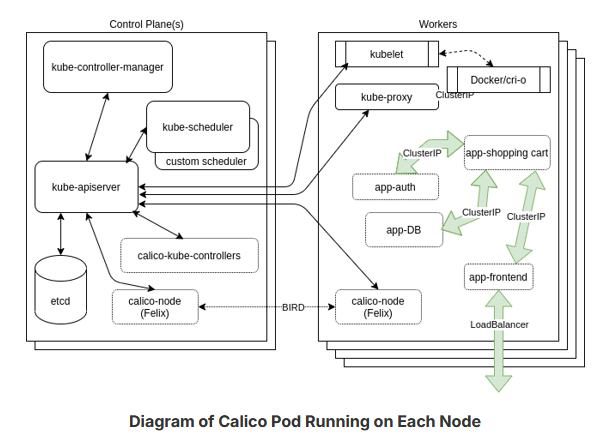
The diagram shows the Calico Pod running on each node and communicating with the BIRD protocol. There are also three ClusterIP services and a LoadBalancer service trying to show how the frontend may communicate with other Pods. The Pods could have been on any worker, and are shown on one only as an example.
Tim Hockin, one of the lead Kubernetes developers, has created a very useful slide deck to understand the Kubernetes networking - "An Illustrated Guide to Kubernetes Networking".